Twistzz’s Config and Settings in CS2: Fine-Tune Your Game for Maximum Impact

Twistzz’s Config and Settings in CS2: Fine-Tune Your Game for Maximum Impact
Twistzz, or as the homies know him, Russel Van Dulken, is that Canadian CS beast who’s been lighting up the servers for years. If you’ve been around the CS scene, you’ve definitely seen his insane highlights – headshots for days, crazy flicks, and the kind of smooth movement that makes you go like, “Wait, did that just happen?” A lot of that comes down to his refined Twistzz cfg and pinpoint Twistzz sensitivity, which help him stay laser-focused during every clutch moment.
He’s currently rocking it with FaZe Clan, where he’s been a crucial part of their success. Before FaZe, Twistzz was out there crushing it with Team Liquid, where he helped secure the Intel Grand Slam faster than anyone thought possible. Fans often look into the Twistzz cfg CS2 to try and replicate that clean aim and fluid movement. Oh, and let’s not forget – he’s got a Major under his belt and several MVPs to his name. If you’re looking for someone who knows how to handle pressure and deliver when it matters most, Twistzz is your guy. Dive into his Twistzz cfg CS2, tweak your Twistzz sensitivity, and start building your own path to greatness using the best from the Twistzz cfg setup.
Twistzz’s Config in CS2, Twistzz’s Sensitivity Settings in CS2, Twistzz’s Crosshair in CS2, Twistzz's Graphics Settings, Twistzz's Viewmodel Settings in CS2, Twistzz's Devices — Mouse, Headphones, and Keyboard in CS2, Twistzz's Skins, Conclusion
Twistzz’s Config in CS2
Alright, let’s get real – Twistzz’s CS2 config isn’t just some basic setup; it’s like the secret sauce that gives him that edge in the server. We’re talking about the perfect blend of precision and style that’s made him one of the deadliest riflers in the game. His config is all about getting those buttery-smooth movements and laser-like headshots that make his plays look effortless.
If you’re serious about leveling up your gameplay, getting your hands on his config is like stepping into his shoes – or, more accurately, his crosshair. So, why not snag his setup and see if you’ve got what it takes to frag like Twistzz?
You can download it via the link below and start flexing those skills!
Twistzz’s Sensitivity Settings in CS2
When it comes to sensitivity settings, Twistzz has found that sweet spot that gives him both speed and control – perfect for those lightning-fast headshots. His sensitivity is dialed in for those snappy flicks and smooth tracking, helping him dominate the server and out-aim the competition.
-
DPI: 400
-
Sensitivity: 1.5
-
eDPI: 600
-
Zoom Sensitivity: 0.9
-
Hz: 2000
-
Windows Sensitivity: 6
Twistzz’s Crosshair in CS2
Twistzz’s crosshair in CS2 isn’t just any crosshair – it’s his secret weapon. This tiny green dot of precision is all about sharp focus and maximum visibility. It’s designed to be minimal but deadly, letting him snap to heads with insane accuracy. You won’t catch Twistzz using anything flashy; he’s all about keeping it clean and efficient, and this tiny green crosshair is perfect for those crispy one-taps and multi-kill moments.
If you’re looking to level up your crosshair game and want something that’s as sleek and lethal as Twistzz’s, then his setup is a must-try.
CSGO-kKpYP-QEytb-RYYEX-Femz8-MkUCP
How to Change Crosshair in CS2
Twistzz's Graphics Settings
If you’re tired of frame drops messing with your flow or just want to see the game the way a pro does, Twistzz’s graphics settings are the way to go. Twistzz’s graphics settings in CS2 aren’t about making the game look pretty – they’re all about making it run like a beast. He’s ditched the flashy visuals for pure performance, cranking up those frames to keep his gameplay smooth and ultra-responsive.
Here’s a bullet-point breakdown of Twistzz’s graphics settings in CS2:
-
Resolution: 1920x1080
-
Aspect Ratio: 16:9
-
Scaling Mode: Native
-
Brightness: 93%
-
Display Mode: Fullscreen
-
Boost Player Contrast: Disabled
-
V-Sync: Disabled
-
NVIDIA Reflex Low Latency: Disabled
-
Multisampling Anti-Aliasing Mode: 8x MSAA
-
Global Shadow Quality: Medium
-
Model / Texture Detail: Low
-
Texture Filtering Mode: Bilinear
-
Shader Detail: Low
-
Particle Detail: Low
-
Ambient Occlusion: Medium
-
High Dynamic Range: Quality
-
FidelityFX Super Resolution: Disabled (Highest Quality)
Twistzz's Viewmodel Settings in CS2
If you’ve ever wondered how the pros keep their screens clean and their shots on point, checking out Twistzz’s viewmodel settings is a must. Let’s dive into how he customizes his view to stay locked in on those headshots while keeping his game looking sharp.
When it comes to viewmodel settings, Twistzz knows that even the smallest details can make a big difference in gameplay. His setup is all about keeping his weapon out of the way, giving him the clearest possible view of the action while still keeping his gun ready to go.
viewmodel_fov 68; viewmodel_offset_x 2.5; viewmodel_offset_y 0; viewmodel_offset_z -1.5; viewmodel_presetpos 2;
Twistzz's Devices — Mouse, Headphones, and Keyboard in CS2
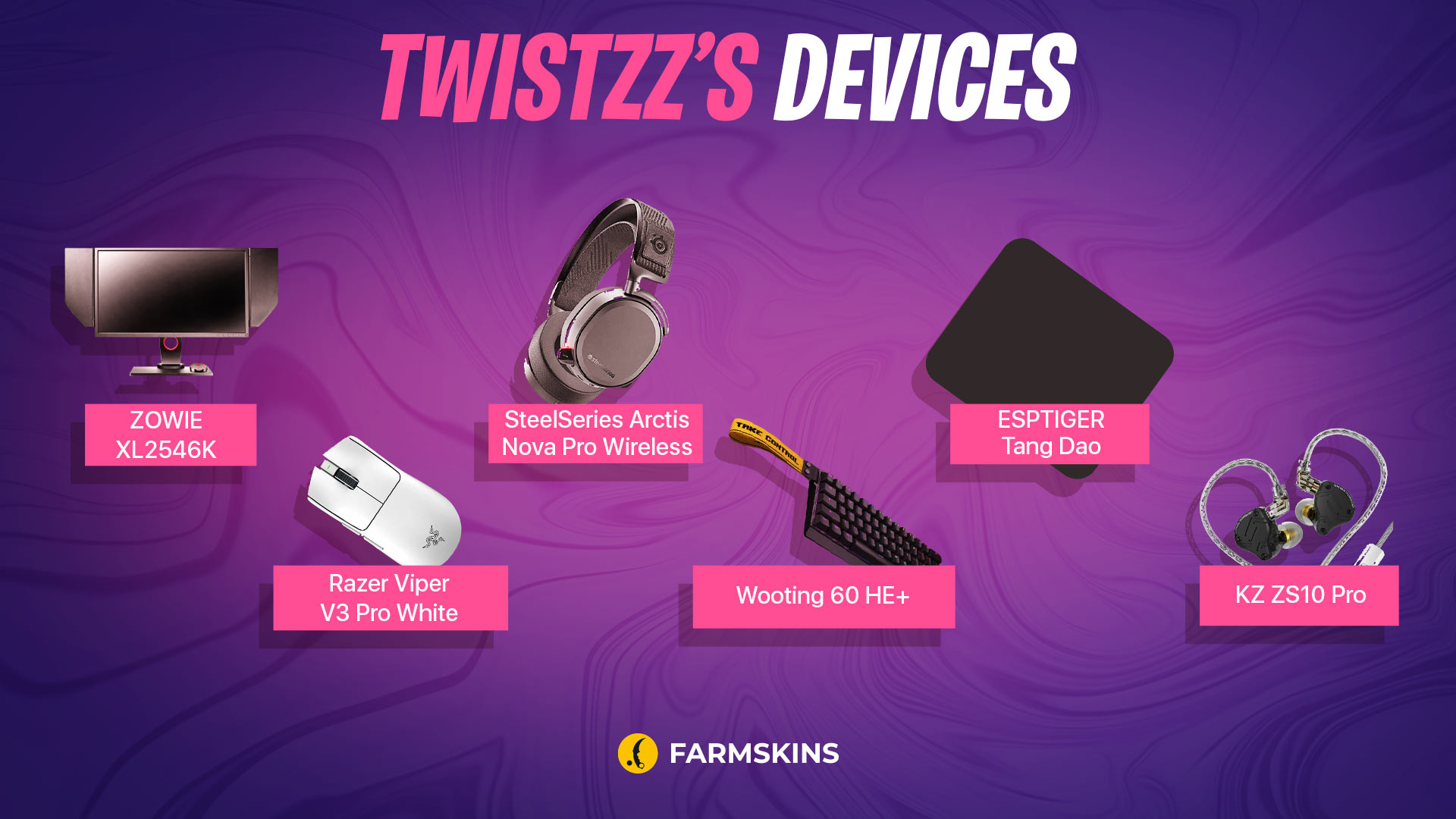
If you’re curious about what gear helps Twistzz stay ice-cold under pressure, you’ve come to the right place. When it comes to fragging out in CS2, Twistzz doesn’t just rely on raw talent – he’s also packing some seriously epic gear that keeps him ahead of the competition.
-
Monitor: ZOWIE XL2546K
-
Mouse: Razer Viper V3 Pro White
-
Keyboard: Wooting 60 HE+
-
Headset: SteelSeries Arctis Nova Pro Wireless
-
Mousepad: ESPTIGER Tang Dao
-
Earphones: KZ ZS10 Pro
Twistzz's Skins
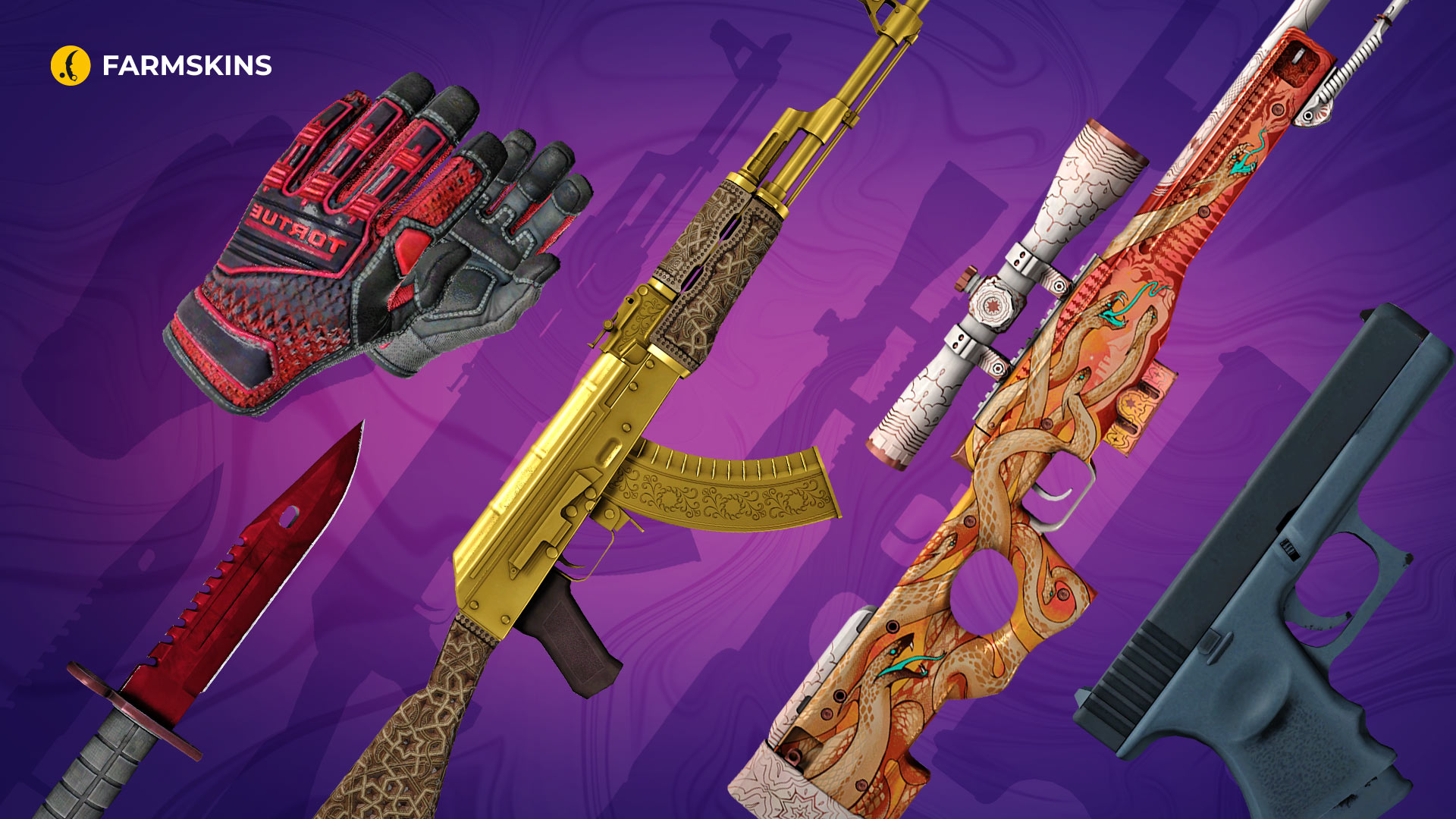
When it comes to skins, Twistzz doesn’t just play – he flexes. His loadout is stacked with some of the freshest skins in the game, making sure he’s turning heads both in and out of the server. If you’re the kind of player who loves to drip while you frag, you’re gonna want to peep Twistzz’s skin collection.
Let’s dive into the custom setups that keep him looking fire while he’s tearing up the competition.
M9 Bayonet | Doppler Ruby (Factory New): This knife is all about that flashy red finish, a perfect blend of elegance and danger that suits Twistzz’s aggressive playstyle.
Average price: $12,000
Specialist Gloves | Crimson Kimono (Minimal Wear): These gloves add a touch of class while keeping things fierce. The red and black combo screams style and deadliness.
Average price: $4,300
Item drops from these cases: Gloves, Streets of Fight, Farmgloves
AK-47 | Gold Arabesque (Factory New): Twistzz brings the bling with this golden beauty. It’s a skin that’s not just for show – it’s a statement piece for those who dominate the battlefield.
Average price: $3,200
Item drops from these cases: Gungir, Ez Covert
AWP | Desert Hydra (Well-Worn): This beastly AWP brings a mythic vibe with its intricate design, perfect for a player like Twistzz who knows how to make every shot count.
Average price: $1,500
Item drops from these cases: Gungir, AWP, Sand, Fast AWP, Hissing Snake
Souvenir Glock-18 | Night (Field-Tested): A sleek and stealthy Glock that complements Twistzz’s precision, making sure his sidearm is as deadly as his rifles.
Average price: $1
Conclusion
Alright, so now you’ve got the full lowdown on how Twistzz dominates the CS2 scene – from his deadly settings to his epic gear and fire skins. If you’re looking to step up your game, there’s no better blueprint than following in the footsteps of this legend. Diving into the Twistzz cfg CS2 can give you valuable insights into how a top-tier pro fine-tunes every detail. His precise aim and movement are the results of both raw skill and perfectly dialed-in Twistzz sensitivity.
But remember, while copying the Twistzz cfg can give you an edge, it’s your own skills and grind that will take you to the next level. So, tweak those settings, experiment with the Twistzz sensitivity, and make the most of what you learn from the Twistzz cfg CS2 setup. Gear up, train hard, and start building your own path to greatness — just like Twistzz did.


