Snax’s Config and Settings in CS2: Pro Setup Guide

Snax’s Config and Settings in CS2: Pro Setup Guide
Janusz “Snax” Pogorzelski, a legendary name in the Counter-Strike scene, is now representing G2 Esports, bringing his wealth of experience to one of the top-tier teams in CS2. Known for his impeccable game sense, clutch potential, and unique lurking style, Snax is a fan-favorite player who has stood the test of time. From his early days with Virtus.pro to his recent success on the big stage, Snax continues to prove why he’s one of the most intelligent players in the game.
With years of competitive experience under his belt and a playstyle that keeps opponents guessing, it’s no wonder players are curious about his setup. Ready to see what makes Snax such a deadly force in CS2? Let’s dive into Snax config and settings!
Snax’s Config in CS2, Snax’s Sensitivity Settings in CS2, Snax’s Crosshair in CS2, Snax’s Graphics Settings, Snax’s Viewmodel Settings in CS2, Snax’s Devices — Mouse, Headphones, and Keyboard in CS2, Snax’s skins
Snax’s Config in CS2
Snax CS2 config isn’t just a random collection of settings—it’s a well-tuned setup that complements his calculated playstyle and clutch potential. Known for his smooth aim and ability to outsmart opponents in critical moments, Snax relies on a config that maximizes precision and visibility, ensuring he’s always one step ahead of his enemies.
Want to see if Snax’s config can give you an edge? You’re in luck! Download his setup using the link below, apply it in your game, and start playing like one of the most experienced veterans in Counter-Strike.
Snax’s Sensitivity Settings in CS2
In Counter-Strike 2, Snax has fine-tuned his sensitivity settings to achieve a balance between swift reactions and precise control. His configuration is as follows:
-
DPI (Dots Per Inch): 400
-
In-game Sensitivity: 2.2
-
Effective DPI (eDPI): 880
-
Zoom Sensitivity: 0.93
-
Polling Rate (Hz): 4000
-
Windows Sensitivity: 6
This setup allows Snax to maintain accuracy during both standard and scoped gameplay, ensuring he can adapt to various in-game scenarios with ease.
Snax’s Crosshair in CS2
When it comes to crosshair preferences, Snax opts for a clean and minimal setup designed for clarity and precision. Snax CS2 crosshair ensures he can maintain focus on his targets without any visual distractions, making it easier to land crucial shots in high-pressure situations.
If you’re looking for a no-nonsense, pro-level crosshair, Snax’s setup might be what you need. Copy and paste the code below into your game to try it out:
CSGO-6B6EF-qROBa-3Kqrw-GPV6P-3hbcP
Crosshair Placement Guide in CS2
Snax’s Graphics Settings
Snax has fine-tuned his graphics settings to maximize visibility and keep his gameplay smooth. His setup focuses on performance over flashy visuals, ensuring he gets high frame rates while still spotting enemies clearly. The stretched resolution helps make enemy models appear larger and easier to hit, a classic choice among pro players.
Here’s a breakdown of key graphics Snax CS2 settings:
-
Resolution: 1280x768
-
Aspect Ratio: 5:3
-
Screen Mode: Fullscreen
-
Scaling Mode: Stretched
-
Brightness: 93%
-
Boost Player Contrast: Enabled
-
V-Sync: Disabled
-
Multisampling Anti-Aliasing Mode: 4x MSAA
-
Global Shadow Quality: Very High
-
Model/Texture Detail: High
-
Texture Filtering Mode: Bilinear
-
Shader Detail: Low
Snax’s graphics settings prioritize performance and visibility, giving him a competitive edge without compromising smooth gameplay. If you’re aiming to improve your reaction time and clarity during matches, Snax’s setup is a solid choice to try out in competitive CS2.
Snax’s Viewmodel Settings in CS2
Snax viewmodel settings are all about keeping his weapon out of the way while ensuring he maintains a clear view of his surroundings. His setup is optimized for better visibility during crucial moments, giving him more focus on his targets rather than his weapon.
If you’re struggling to find the right viewmodel balance, trying Snax’s settings might help you improve your situational awareness in-game. Here’s how he sets up his viewmodel in CS2:
viewmodel_fov 68
viewmodel_offset_x 2.5
viewmodel_offset_y 0
viewmodel_offset_z -1.5
viewmodel_presetpos 2
This minimal and clean viewmodel helps Snax stay sharp during tense gunfights, making sure nothing gets in the way of his deadly aim. If you’re looking for better focus and less visual clutter, Snax’s setup is worth a try!
Snax’s Devices — Mouse, Headphones, and Keyboard in CS2
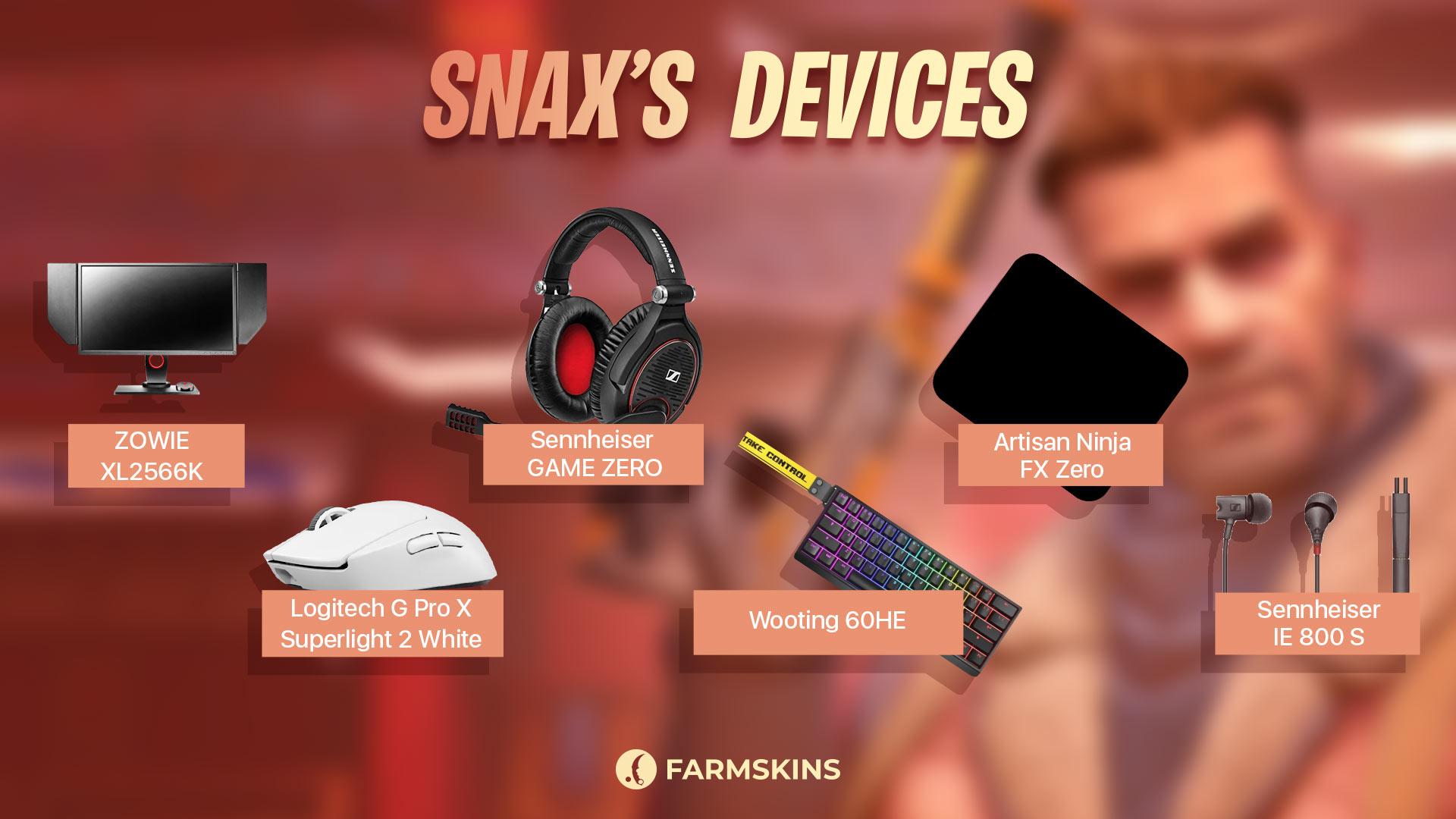
Snax relies on top-tier peripherals to ensure his gameplay remains sharp and responsive. His gear is carefully selected to provide precision, comfort, and performance, giving him an edge in competitive matches. Whether it’s his high-refresh-rate monitor or his lightweight mouse, each piece of equipment plays a crucial role in helping him dominate the server.
Here’s a breakdown of Snax’s current device setup:
-
Monitor: ZOWIE XL2566K
-
Mouse: Logitech G Pro X Superlight 2 White
-
Keyboard: Wooting 60HE
-
Headset: Sennheiser GAME ZERO
-
Mousepad: Artisan Ninja FX Zero (Soft, Black)
-
Earphones: Sennheiser IE 800 S
Looking to step up your gear? Snax’s setup offers a perfect blend of precision, comfort, and durability—a tried-and-true combination for any serious CS2 player.
The secrets behind Pro players setup
Snax’s skins
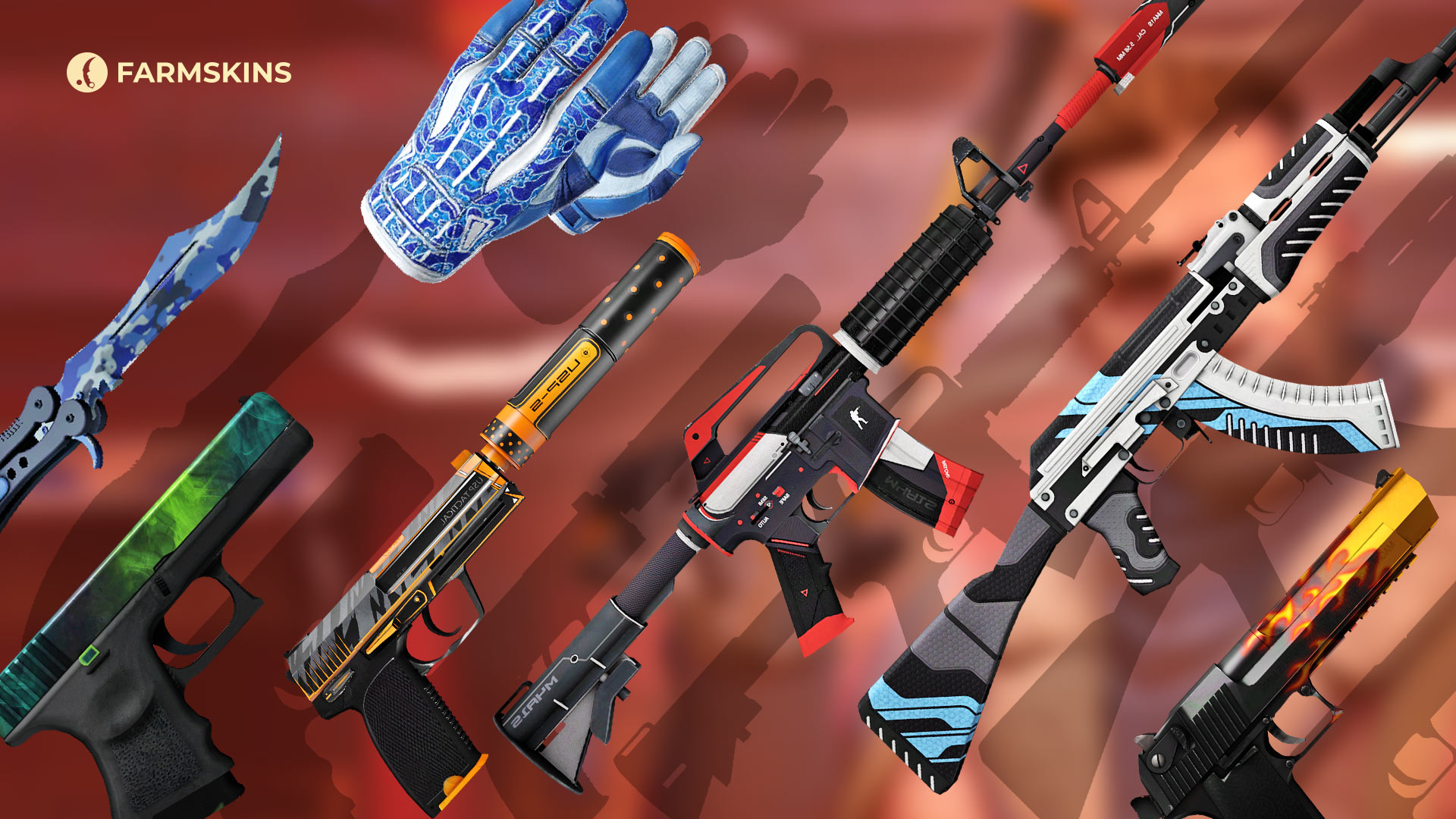
Skins in CS2 are more than just a cosmetic flex—they’re a way for players to show off their personality and style. Snax’s collection strikes a balance between sleek aesthetics and legendary status, reflecting his cool-headed, clutch-heavy playstyle. From classic knives to iconic rifles, Snax’s skins are as memorable as his gameplay.
Knife: Butterfly Knife | Bright Water (Minimal Wear)
This knife features a sleek blue camouflage pattern, blending elegance and stealth. Perfect for a player like Snax, who thrives in clutch situations.
Average Price: $1200
Item Drops From These Cases: Dreams & Nightmares
Gloves: Sport Gloves | Amphibious (Minimal Wear)
Snax rocks these vibrant blue-and-green gloves, which provide both style and comfort during intense matches. They’re a perfect complement to his overall inventory.
Average Price: $900
Item Drops From These Cases: Gungnir, Gloves, Revolution
AK-47: StatTrak™ Vulcan (Minimal Wear)
The AK-47 Vulcan is a fan-favorite skin with a futuristic design, combining blue, black, and white elements. This rare skin perfectly matches Snax’s cool and precise playstyle.
Average Price: $1200
Item Drops From These Cases: Gungnir, Exclusive, Covert, Lotus
M4A1-S: StatTrak™ Cyrex (Minimal Wear)
This sleek black-and-red skin gives the M4A1-S a modern and aggressive look. It’s a perfect choice for a player like Snax who prefers clean, no-nonsense skins.
Average Price: $35
Item Drops From These Cases: Covert, The Boss, Shadow, Snakebite
Glock-18: Gamma Doppler Phase 2 (Minimal Wear)
The Gamma Doppler skin offers a mesmerizing green-and-black pattern, making Snax’s Glock-18 stand out in every match.
Average Price: $60
Item Drops From These Cases: Covert, Rush, Doppy
USP-S: StatTrak™ Orion (Minimal Wear)
The USP-S Orion is a striking black-and-orange skin that adds a touch of boldness to Snax’s pistol loadout. It’s a sleek option for any serious player.
Average Price: $100
Item Drops From These Cases: Classified, Top Guns
Desert Eagle: Blaze (Factory New)
A classic and legendary Deagle skin, the Blaze features a fiery barrel design that makes every shot look explosive and deadly.
Average Price: $700
Item Drops From These Cases: Gungnir, Restricted, Top Guns
And there you have it—the full breakdown of Snax’s CS2 setup. From his sensitivity and crosshair settings to his gear and iconic skins, every detail of his config is finely tuned for competitive play. Snax’s setup isn’t just about precision—it’s about maximizing performance and staying focused when it matters most.
Whether you’re looking to upgrade your own gameplay or simply curious about how a veteran like Snax approaches the game, his config offers plenty of insights. But remember, while copying a pro’s setup can give you an edge, your skill and dedication will always be the key to improving.
So, take what you’ve learned, hit the server, and who knows—you might just start pulling off those legendary Snax-style clutches in your own matches. GG and go frag some noobs!


